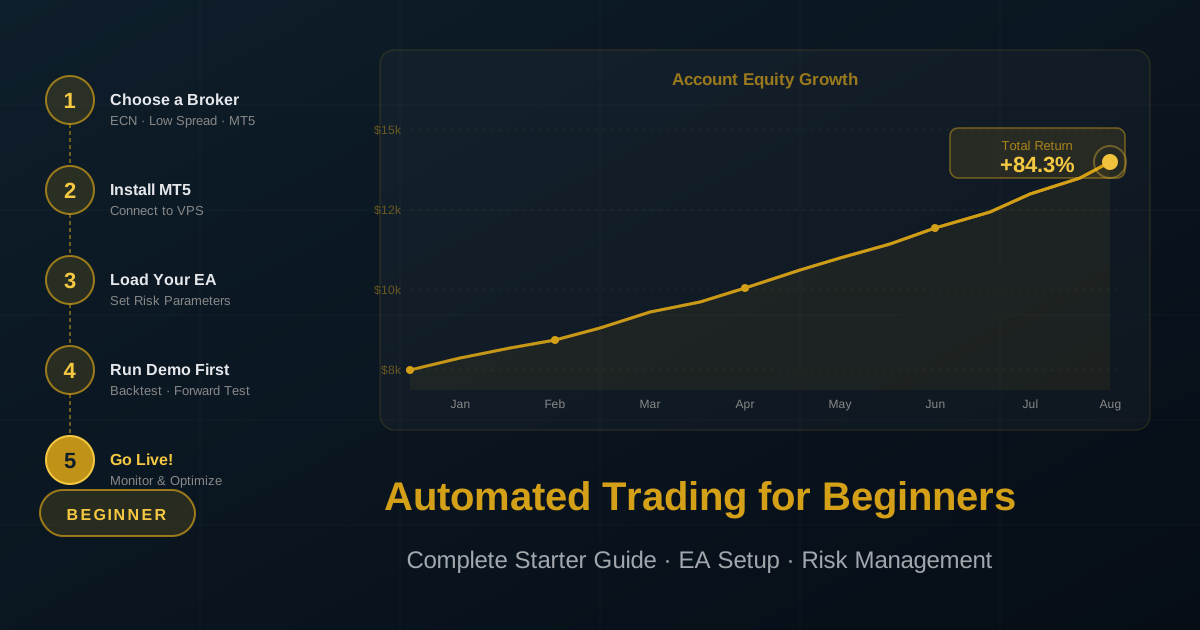
Automated Trading for Beginners: Complete Starter Guide
Automated trading — also called algorithmic trading, algo trading, or systematic trading — has made it possible for retail traders to deploy the same type of rule-based execution strategies that institutional funds have used for decades. If you are new to the concept, this guide explains everything you need to start safely: what automated trading actually is, how the technology works, what it realistically costs to get started, the risks you need to manage, and a structured first-month plan.
What is Automated Trading?
Automated trading uses computer programs to analyse market data and execute trades based on a set of predefined rules — without requiring a human to click buy or sell. Instead of watching charts for hours and making subjective decisions under emotional pressure, the software applies your strategy consistently, at any time of day, with no hesitation or second-guessing.
The rules an automated system follows can range from simple ("buy when the 20 EMA crosses above the 50 EMA") to highly complex multi-factor models that incorporate price action, volatility, session timing, and position sizing calculations simultaneously.
Benefits of Automation
- Removes Emotions: Fear and greed cause most trading losses. An automated system executes your rules exactly as designed, even during volatile markets when emotions would cause a human to freeze or abandon their plan
- 24/5 Operation: Currency markets trade from Sunday 22:00 GMT to Friday 22:00 GMT continuously. A human trader physically cannot monitor all sessions. Automated systems never sleep
- Consistent Execution: Rules are applied identically on every single trade — no exceptions, no lapses in discipline
- Backtesting: Before risking real money, you can test a strategy on years of historical data to understand how it would have performed across different market conditions
- Speed: Automated systems can analyse conditions and place orders in milliseconds, faster than any human can manually react
Honest Drawbacks
- Technical Failures: A software crash, internet outage, or broker connectivity issue can cause missed trades or, more dangerously, prevent stop-losses from being updated. A VPS (Virtual Private Server) mitigates this but does not eliminate it
- Over-Optimisation Risk: Strategies optimised to fit historical data precisely often fail on live markets — the market changes, but the strategy stays calibrated to the past
- Strategies Stop Working: Market regimes change. A strategy that performed excellently for two years may stop working as liquidity patterns, volatility levels, or correlations shift. Ongoing monitoring is always required
- Initial Setup Complexity: The learning curve for setting up a broker account, a VPS, and an EA correctly takes 1–3 weeks for complete beginners. This guide shortens that considerably
Types of Automated Trading Strategies
Before choosing or purchasing an EA, understand the broad categories of automated strategies and their risk profiles:
Trend-Following Systems
These EAs identify directional momentum and trade in the direction of the prevailing trend. They typically have lower win rates (40–55%) but higher payoff ratios — they catch large moves and accept many small losses. Trend-following systems work best in volatile, directional markets and struggle during sideways, choppy conditions.
Mean-Reversion Systems
These EAs identify when price has moved too far from its average and bet on a return to equilibrium. They typically have higher win rates (60–75%) but smaller individual gains. They perform well in ranging markets and can suffer significant losses during strong trend breakouts.
Scalping Systems
Scalping EAs execute many trades per day, targeting 2–10 pips per trade with tight stop-losses. They require very low spreads, fast execution, and a broker that permits scalping. Scalping strategies are highly sensitive to broker execution quality — what works on one broker may be unprofitable on another due to spread differences alone.
News-Based Systems
These EAs trade around scheduled economic announcements (Non-Farm Payrolls, CPI, FOMC decisions). They can generate large profits on individual events but carry high risk due to slippage and spread widening during news releases. Most beginners should avoid news-based EAs until they understand execution risk thoroughly.
What to Avoid: Martingale and Grid Systems
Martingale EAs double position size after each losing trade to recover losses faster. Grid EAs open multiple positions at fixed intervals in both directions. Both approaches can appear highly profitable for months or years before a single adverse market event destroys the entire account. These strategies do not manage risk — they defer it. Avoid them entirely.
Choosing the Right Platform
MetaTrader 5 (MT5) — Recommended for Beginners
MT5 is the global standard for retail automated trading. It is supported by the majority of regulated forex brokers, has the largest library of available EAs and indicators, and provides full backtesting capabilities built into the platform. If you are unsure which platform to use, start with MT5.
MetaTrader 4 (MT4)
MT4 is the older predecessor to MT5. It still has a large user base and many EAs are written for it, but MetaQuotes (the developer) has phased out new development. Most brokers that offer MT4 also offer MT5. Choose MT5 for any new setup.
cTrader
cTrader is a modern alternative platform with a cleaner interface, faster execution, and native support for algorithmic trading through its own programming language (cAlgo/C#). It is particularly popular among experienced traders. Many brokers offer both MT5 and cTrader — cTrader is worth exploring after you have mastered the basics on MT5.
How to Select a Broker for Automated Trading
Your broker choice directly affects the profitability of automated strategies. The same EA can be profitable on one broker and lose money on another due to differences in spread, execution speed, and trading conditions.
Key criteria to evaluate:
- Spreads: Look for ECN/raw spread accounts for gold and major pairs. A gold spread of 2–3 points is acceptable; 8–15 points makes most strategies unprofitable
- Execution Speed: Order confirmation should be under 100ms. Test with a demo account before committing real capital
- Platform Support: Confirm MT5 (or cTrader) is fully supported, not just offered as a secondary option
- Regulation: Use only brokers regulated by Tier-1 authorities (FCA, ASIC, CySEC, BaFin, MAS). Regulation provides investor protection and disputes resolution. The CFTC's consumer guide to forex fraud covers the key red flags to check before depositing
- Deposit and Withdrawal: Check that your preferred payment method works and that withdrawals process within a reasonable timeframe (2–5 business days)
- Scalping and EA Policy: Some brokers restrict or ban automated trading. Confirm that EAs are permitted before depositing
How Much Capital Do You Need?
This is the most common question beginners ask, and the honest answer depends on your risk management approach.
Minimum Viable Capital
With a broker offering micro-lots (0.01 lot minimum), you can start with as little as $100–$200 to test an EA with meaningful (but limited) real money risk. At $200 with 1% risk per trade, your maximum risk per trade is $2 — large enough to pay spreads and commissions, small enough that mistakes are inexpensive lessons.
Realistic Starting Capital for Meaningful Returns
At $500–$1,000, you can trade with standard micro-lot position sizing and begin to see meaningful absolute returns even at conservative risk percentages. This range allows proper position sizing without over-leveraging.
Professional Capital Thresholds
Most experienced automated traders manage accounts of $5,000–$10,000 minimum. At this level, 1–3% monthly returns generate meaningful absolute dollar amounts while keeping risk parameters conservative enough to survive drawdown periods.
**Never invest capital you cannot afford to lose entirely.** Automated trading is not guaranteed income. Even the best-performing EAs experience extended drawdown periods, and real trading conditions always differ from backtests.
Understanding Drawdowns
A drawdown is the peak-to-trough decline in your account equity. Every profitable trading strategy experiences drawdowns — they are a normal and unavoidable feature of systematic trading, not a sign that something is broken.
What matters is the **maximum drawdown** and the **recovery time**:
- A 10% drawdown requires an 11.1% gain to recover — manageable
- A 20% drawdown requires a 25% gain to recover — significant but survivable
- A 50% drawdown requires a 100% gain to recover — catastrophic for most accounts
When evaluating any EA, ask: "What is the historical maximum drawdown, and how long did recovery take?" An EA that shows a 40% maximum drawdown but recovers in 4 months is very different from one that took 18 months to recover the same drawdown.
Getting Started: Step-by-Step
Step 1 — Open a Demo Account
Every broker offers free demo accounts with virtual money. Use a demo account exclusively for your first 4 weeks. This allows you to learn the platform mechanics, observe how the EA behaves in live market conditions (not just backtests), and identify any setup issues before risking real capital.
Step 2 — Install Your EA on MT5
1. Download the EA file (.ex5 format for MT5)
2. Open MT5 → Tools → Open Data Folder → MQL5 → Experts
3. Copy the EA file into this folder
4. Restart MT5 and the EA will appear in the Navigator panel
5. Drag the EA onto your chosen chart (XAUUSD, H1 for most gold strategies)
6. Configure risk settings in the EA properties dialogue
Step 3 — Set Up a VPS
A VPS ensures your EA runs 24/5 without interruption even when your computer is off. Choose a Windows VPS located in the same data centre as your broker's trading server for the lowest latency.
VPS minimum specifications:
- 1 dedicated CPU core
- 2 GB RAM
- 50 GB SSD
- Windows Server 2019 or later
- Latency to broker server under 20ms
Step 4 — Connect MT5 on VPS to Your Broker
Install MT5 on the VPS (not your local computer for 24/7 operation), log in with your broker account credentials, copy your EA files to the VPS, and configure the EA with your risk settings. The VPS will keep MT5 running even when you are not connected.
Step 5 — Monitor Daily for the First Month
During your first month, check performance daily. Confirm that:
- Stop-loss orders are being placed correctly on every trade
- Position sizes match your risk settings
- The EA is not trading outside your permitted hours
- No unexpected losses occurred due to spread widening during news events
Risk Management for Beginners
The 1–2% Rule
Never risk more than 1–2% of your account balance on any single trade. At this level, a losing streak of 10 consecutive losses (rare but not impossible) reduces your account by 10–18%, which is recoverable. At 5% risk per trade, the same losing streak destroys 40% of your account.
Position Size Calculation
Position size in lots = (Account Balance × Risk%) ÷ (Stop-Loss in pips × Pip Value per lot)
Example: $2,000 account, 1% risk, 15-pip stop on EURUSD = (2,000 × 0.01) ÷ (15 × 10) = 0.013 lots (round to 0.01)
Maximum Drawdown Limits
Set these in your EA settings or enforce them manually:
- Daily limit: Stop trading after 3% account loss in one day
- Weekly limit: Reduce risk by 50% after 6% weekly loss
- Monthly hard stop: Pause trading for 48 hours and review if monthly loss exceeds 12%
Common Beginner Mistakes
Skipping the Demo Period: Two weeks of demo trading feels slow, but it catches setup errors before they cost real money
Ignoring Drawdowns as "Temporary": All drawdowns feel temporary until they are not — honour your predefined loss limits
Using Fixed Lot Sizes: Fixed lots mean you risk a higher percentage as your account shrinks after losses. Always use percentage-based risk settings
Changing Settings During a Drawdown: The worst time to change an EA's parameters is during a losing period, which is exactly when the temptation is strongest. Make parameter changes only during review periods, not in reaction to recent losses
Unrealistic Return Expectations: Consistently profitable automated traders target 1–3% monthly returns, not 10–30%. Any EA promising double-digit monthly returns consistently is either using dangerous risk settings or presenting cherry-picked data
Your First Month Plan
**Week 1–2: Demo Setup and Observation**
- Open a demo account with your chosen broker
- Install EA on MT5, configure default risk settings
- Run without any changes and document every trade
- Identify any technical issues with execution
**Week 3–4: Review and VPS Migration**
- Review demo performance: is it consistent with the EA's published forward-test results?
- Set up your VPS and migrate MT5 to it
- Confirm everything runs correctly on VPS for 3–5 days before going live
**Month 2: Live Trading with Minimum Risk**
- Fund a live account with your intended starting capital
- Set risk to 50% of your normal settings (half position size)
- Trade for one full month before increasing to full risk
- Keep a trading journal documenting observations and any anomalies
Conclusion
Automated trading offers genuine advantages — emotional consistency, 24/5 availability, and the ability to test ideas on historical data before risking real capital. However, it is not passive income and it is not risk-free. The traders who succeed with automation are those who take the time to understand the tools, verify performance claims critically, manage risk conservatively, and monitor their systems consistently.
Start with a reputable EA that uses hard stop-losses and no martingale mechanics, run a proper demo period, fund a live account conservatively, and treat the first six months as an education rather than a profit centre.
Quantum Algo's Expert Advisors are built for traders who value transparency over hype — hard stop-losses on every trade, verified Myfxbook live results, and clear documentation of trading logic. Whether you are starting with $500 or $50,000, the same risk management principles apply.